Frequently asked Questions
Common errors and issues
Sumitting jobs in an interactive session
You get an error like this:
srun: error: CPU binding outside of job step allocation, allocated CPUs are: 0x0000000000000001000000000000000100000000000000010000000000000001.
Then you tried to submit a job inside of an interactive session. Submit the job on the login node instead.
Building singularity/apptainer images takes a long time
singularity and apptainer use mksquahsfs to integrate your customsations into the final image.
Unfortunately mksquahsfs is known to be not very performant. Depending on the size of your
image it can take from minutes to hours to build the final image.
Other compilers
Julia 2 has an installation of the INTEL OneApi compilers and libraries. In order to use the compilers run:
source /opt/intel/oneapi/setvars.sh
Disk quota and usage
Running commands like df will aks the metadata servers for each file about filesize, date, user permissions and so on. For a lot of small files this causes a lot of
requests on these servers. The overall working experience with the filesystem will decrease under high load. Fortunately ceph keeps track of directory sizes. You can ask
the disk usage of your $HOME directly via:
getfattr -n ceph.dir.rbytes $HOME 2> /dev/null
# file: home/<user>
ceph.dir.rbytes="85380812939"
And the get quota via:
getfattr -n ceph.quota.max_bytes $HOME 2> /dev/null
# file: home/<user>
ceph.quota.max_bytes="200000000000"
The numbers are in bytes. To make this more human readable, you can convert the files to IEC binary format:
getfattr -n ceph.dir.rbytes $HOME 2> /dev/null | grep ceph.dir.rbytes | grep -oP '(?<=\").*(?=\")' | numfmt --to=iec-i --suffix=B
80GiB
Or run the script:
/usr/local/bin/getquota.sh
You are currently using 80GiB of your quota of 187GiB
Running remote IDEs
Please do not run remote IDEs like vscode, jetbrains or cursor on the login nodes. These "editors" require a lot of memory. It's fine if you do it on your local system but if everybody runs such IDE on the login node the memory will be filled rapidly by this IDEs. Remember: The login node is not your personal development machine but a shared server for a lot of users.
If you are familiar with code development, you should know techniques like versioning (e.g. git) and productive/development environments or remotly mounting the filesystem (e.g. sshfs) and run the IDE local. You can also automate your code deployment.
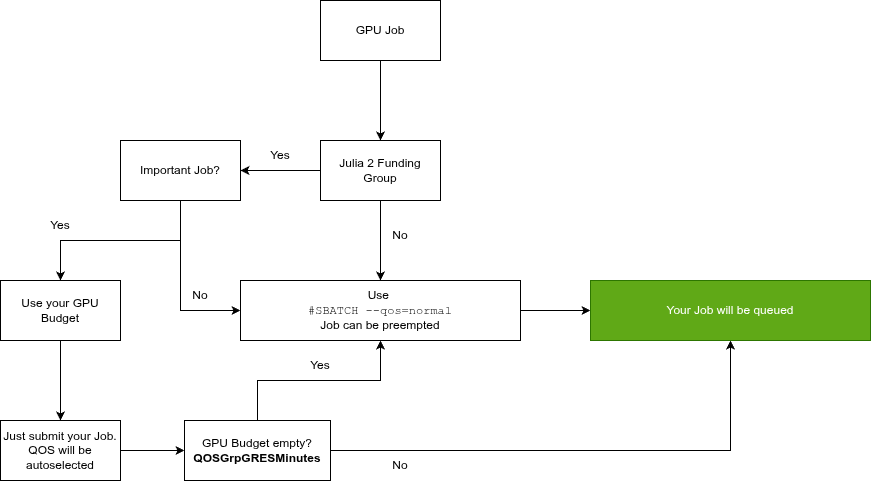
Which QOS should I use to run my GPU job?
If you frequently get an QOSGrpGRESMinutes error, your monthly GPUh budget is full. You can still submit GPU jobs by using the normal qos.